A crew of workers at desks, appearing one by one in an open field.

CrewPoppy · AI agents in your own cloud

Focus on what matters. Delegate the rest to your AI agents.

CrewPoppy gives you AI agents that take on the work you'd rather not do yourself — for your business or your own life. They're free, they run inside your own AWS account, and nothing they write reaches another person until you approve it.

  • FreeYou pay AWS for what your agents actually use. Nothing to us.
  • No sign-upNo account with us, no password to create. Connect your AWS and go.
  • Your own cloudYour work never leaves the account you control and pay for.
  • Nothing sent without youEvery message to another person waits for your approval.

Installs through AgentsPoppy on Mac, Windows and Linux. You'll need your own AWS account — the agents live there, not with us.

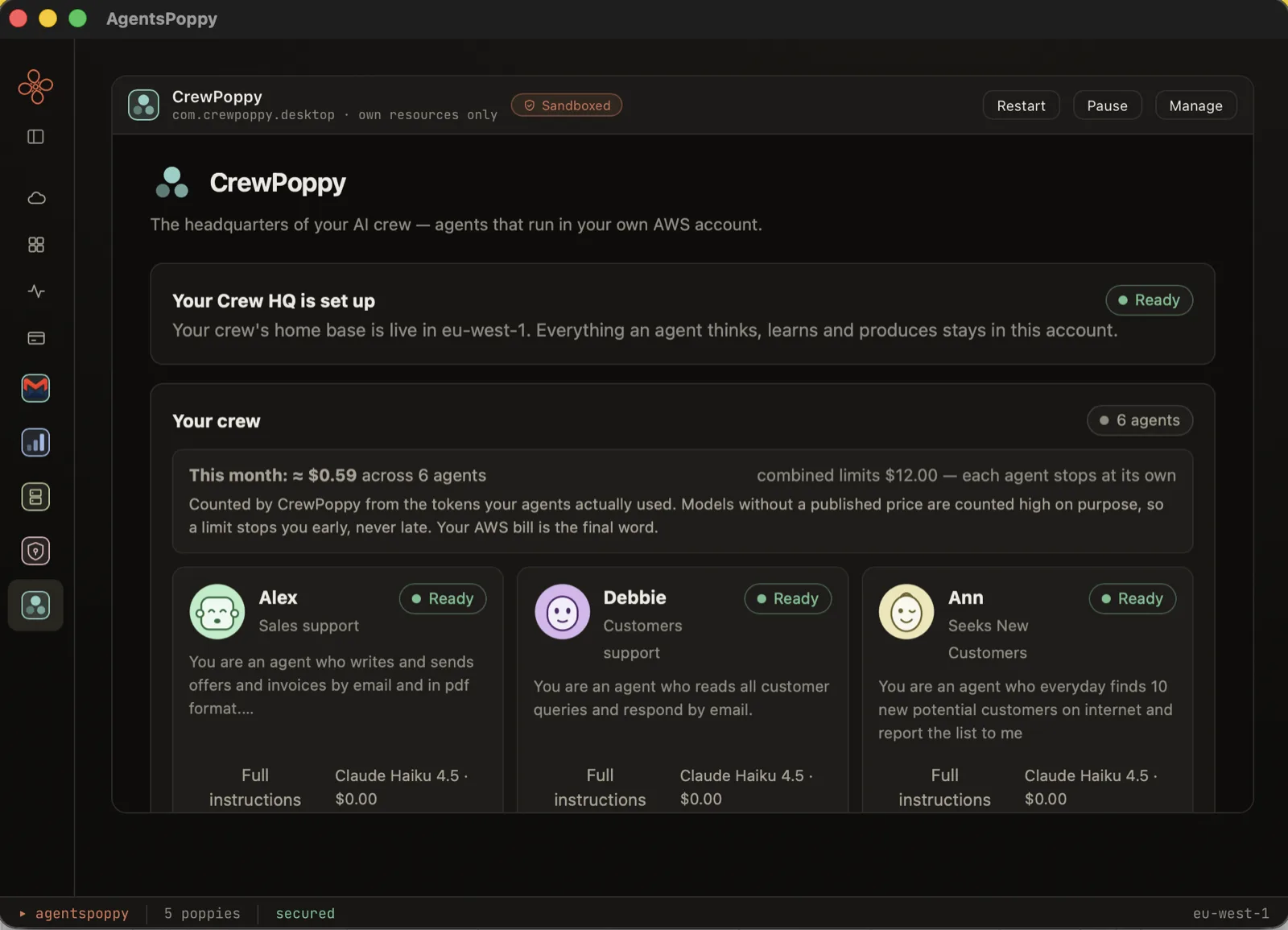
The CrewPoppy dashboard showing six AI agents — Alex, Debbie, Ann and others — each with a face, a role and this month's spending against its limit.
Your agents, with what each has spent this month and the limit it stops at. Every picture of the product on this page is a real, unretouched screenshot.

Delegate the work you'd rather not do

Some of it belongs to a business: the offer that has to go out today, the invoice that has to match last month's, the document somebody wants summarised. Some of it is just yours: the letter you keep putting off, the forty-page policy you'd rather not read, the notes nobody has written up. Either way it still has to happen, and it is still you doing it.

That's what you hand to an agent.

  • Write a letter, an offer or an invoice from your own template, as a finished PDF
  • Read the documents you give it — a contract, a policy, a pile of notes — and answer questions about what's in them
  • Draft the message you keep putting off, and wait for you before it sends
  • Keep the notes and the record, so the next time you ask, it already knows
  • Work to a schedule — every hour, every day, or once a week — and get on with it whether or not your computer is on

You stay on the part only you can do. Each agent has a job you describe in a sentence or two, a folder of its own and a monthly limit — so handing something over is a decision you can make in a minute, and take back just as quickly.

Or start from one that's ready

You don't have to describe an agent from a blank box. CrewPoppy ships with ready-made ones — a name, a written brief, the abilities the job needs and a sensible monthly limit, all filled in. Pick one, read what it says, and change anything you like before you save it.

Max

Writes offers and invoices

Give it your invoice template once. Then one message — customer, amount, what for — gets you a finished PDF, and nothing is emailed until you approve it.

  • See its own files
  • Read its own files
  • Write files
  • Create PDF documents
  • Remember things
  • Save to memory
  • Ask you before acting
  • Email you
  • Email other people

Suggested limit $10/month · comes with an offer template

Nora

Answers questions about your documents

Drop contracts, policies or notes into its files, and ask in plain words: what does it say about notice periods? It answers from the documents, not from imagination.

  • See its own files
  • Read its own files
  • Remember things
  • Save to memory

Suggested limit $5/month · reads only, never writes

Penny

Tracks your expenses

Tell it what you spent — "paid the doctor 34 euro today" — and it files the expense under your own categories, keeps the spreadsheet, and reports back: totals by month, by category, or the whole year.

  • See its own files
  • Read its own files
  • Write files
  • Add to a list or ledger
  • Create PDF documents
  • Remember things
  • Save to memory
  • Ask you before acting
  • Email you

Suggested limit $5/month · the spreadsheet opens in Excel

Kitty

Splits shared expenses

For a trip or a shared house: tell it who's in and who paid what as you go. At the end, it settles the kitty — who owes, who receives, and the working shown so everyone can check it.

  • See its own files
  • Read its own files
  • Write files
  • Add to a list or ledger
  • Create PDF documents
  • Remember things
  • Save to memory
  • Ask you before acting
  • Email you

Suggested limit $5/month · shows its working

Piet

Your morning web brief

Give it the pages you check every day — news, prices, a status page. Every morning it reads them and emails you one short summary.

  • Read web pages
  • See its own files
  • Read its own files
  • Remember things
  • Save to memory
  • Email you

Suggested limit $5/month · runs daily at 07:30

A ready-made agent fills the form in — it can't tick the boxes. Every ability above is a suggestion, shown to you in exactly this list, and it is still you who grants it and presses save. That's the whole point: "use this template" can never become a way to walk somebody through a permission they never read.

These are the ones available today, and more are added over time. Each one has actually been run before it was included — a template that fails the first time you use it is worse than the empty box it replaced, so plausible-sounding ones wait until they've been proven.

What it is

Most AI tools keep your work on someone else's servers. CrewPoppy doesn't. When you install it, it builds a small backend inside your own AWS account: a database for your agents and what they remember, a folder for the files they make, and one function that does the thinking. Your agents, their instructions, their conversations and their documents live there — under your billing, your access controls, your rules.

Removing it takes everything with it. That isn't a promise in a document; the uninstall is tested against the real cloud and has to leave nothing behind.

Nothing gets sent without you

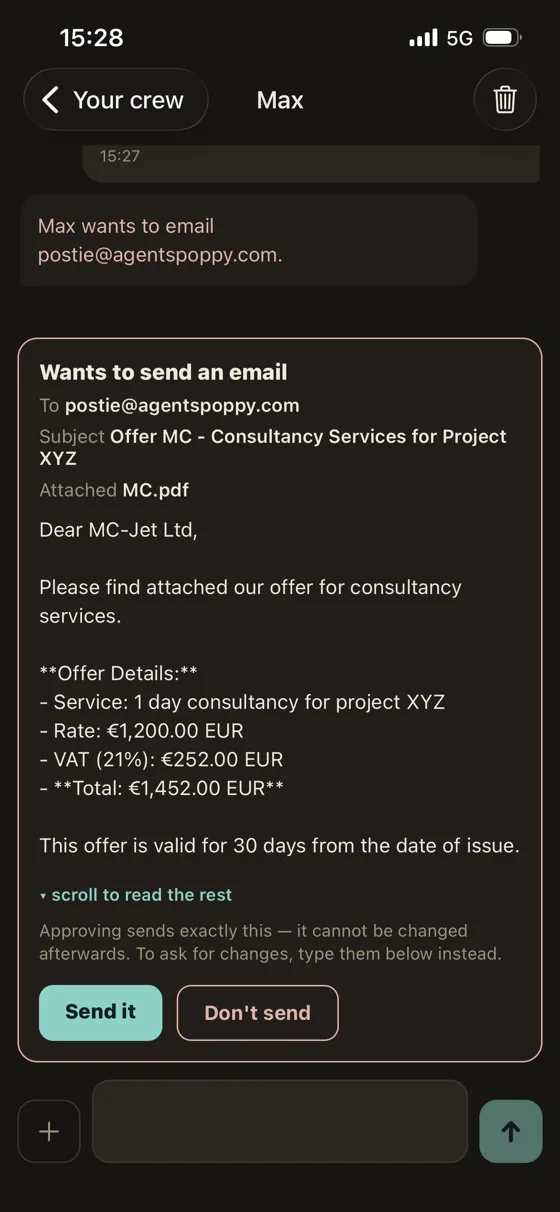
An agent can research, write, keep notes and prepare a message. It cannot send that message to another person on its own. It stops and shows you the exact recipient, the exact subject and the exact words, and waits.

Approving sends precisely that stored text — the agent doesn't get another turn to change the address or the wording afterwards. And approval is a button, never a phrase: typing "yes, go ahead" in the conversation is a message, not consent.

The CrewPoppy phone app showing an agent's proposed email — recipient, subject, attachment and full text — above Send it and Don't send buttons.

You decide what each agent can reach

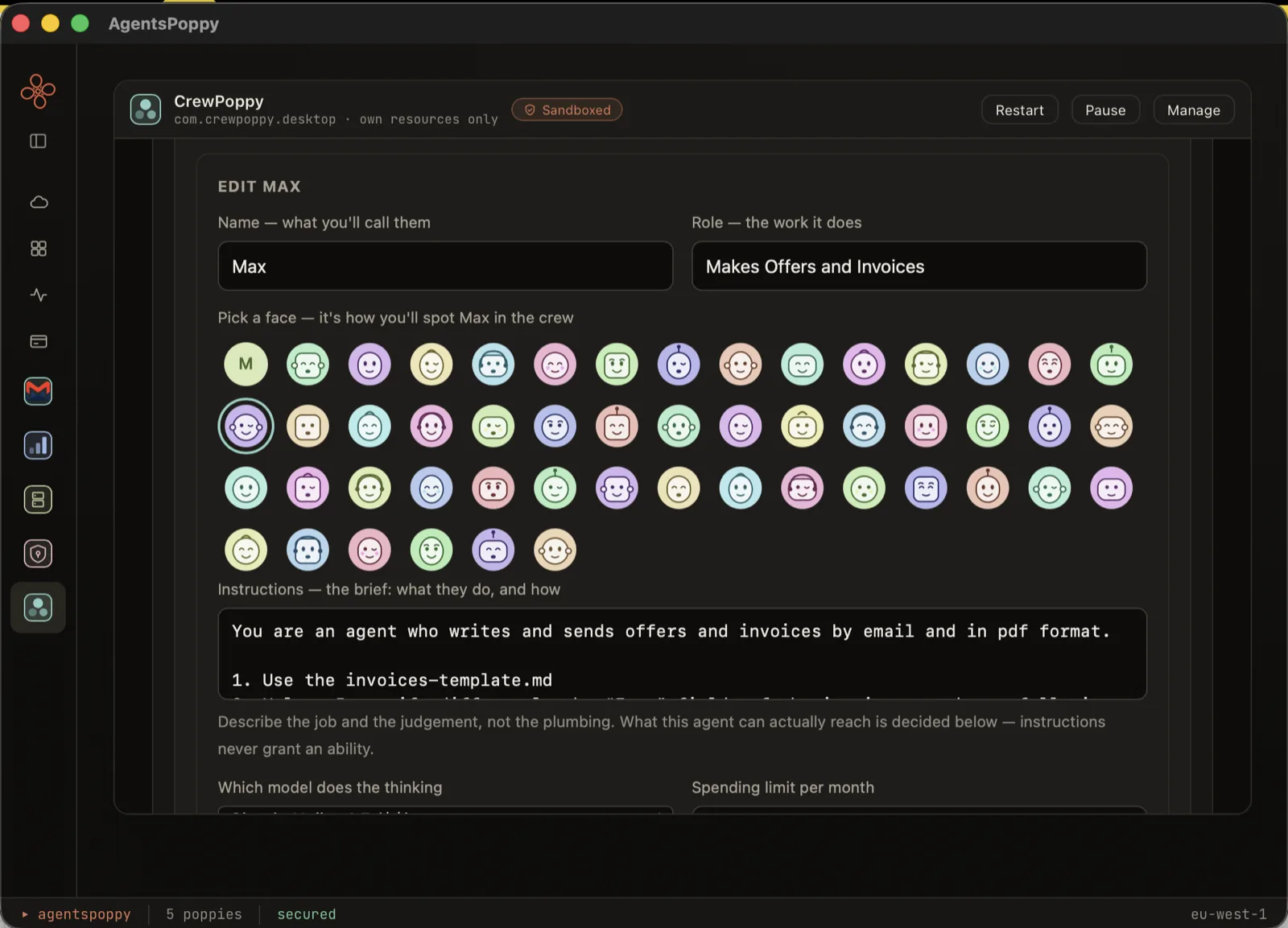
Every ability is something you grant deliberately — reading its own files, writing documents, emailing you, emailing other people. A new agent starts able only to read the task you type and answer it, which is a safe place to begin.

Instructions describe the job; they never grant an ability. An agent that has been argued into anything at all still can't do what you didn't tick.

The CrewPoppy agent editor: name, role, a grid of fifty faces to choose from, the agent's written instructions, its model and its monthly spending limit.

And when it needs you, it finds you

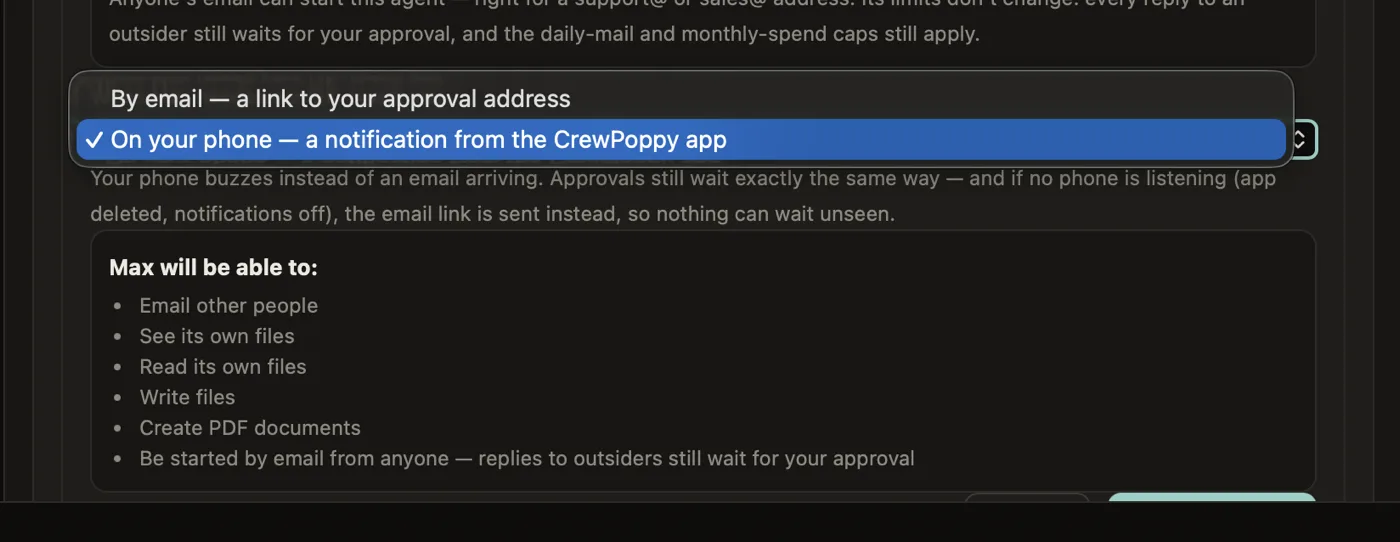
You choose, per agent, whether it reaches you by email or on your phone. If you pick the phone and no phone is listening, the email is sent instead — so a request can never sit waiting where nobody sees it.

Choosing how an agent reaches its owner — by email with a link, or as a notification on the phone — beside the list of what that agent is allowed to do.

Give them the documents they need

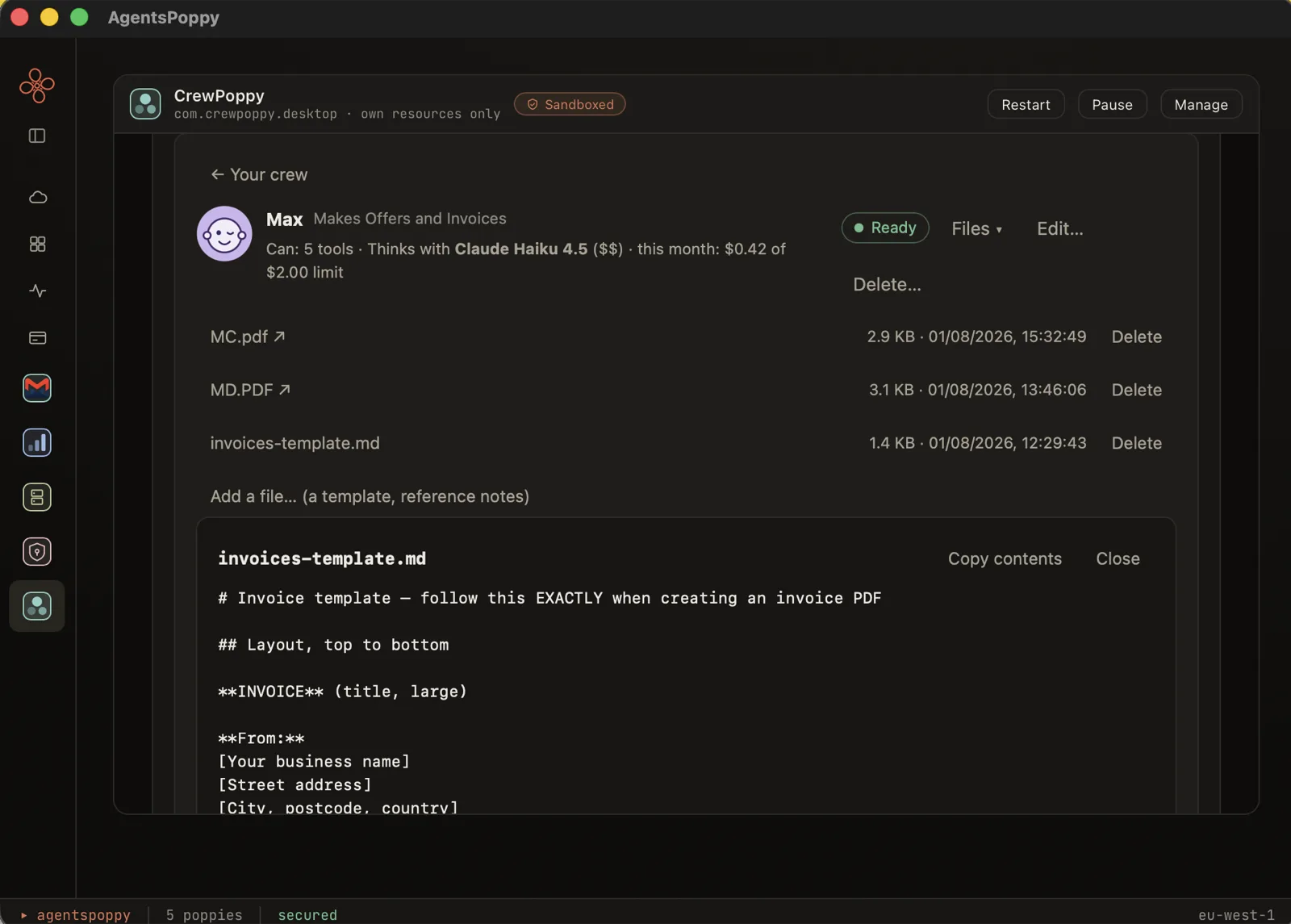
Each agent has its own folder. Put a template, a price list or reference notes in it, and the agent works from those instead of inventing. Anything it produces — a PDF offer, a report — lands in the same folder, where you can read it, download it or delete it.

An agent's own files in CrewPoppy — PDFs it produced and an invoice template it follows — with the template's contents open for reading.

Three AI agents, or three hundred

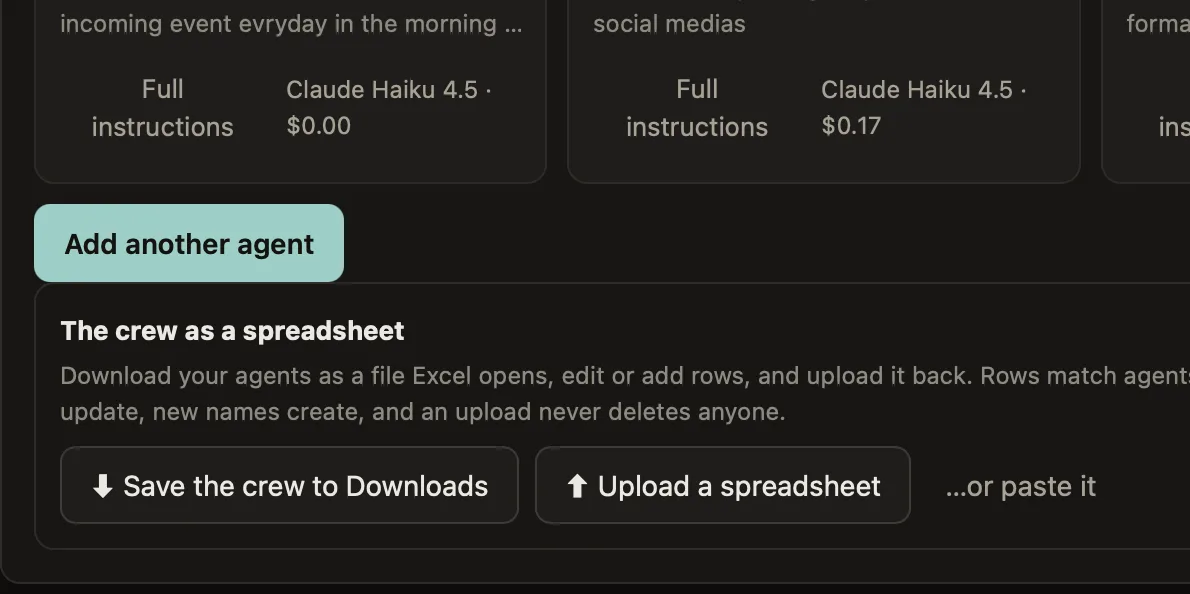
Save your agents to a file Excel opens, edit it, and upload it back to create or update hundreds at once. Rows match agents by name, so existing names update and keep their history — and an upload never deletes anybody.

The same download works as the template when you're starting from nothing, and your data goes out as easily as it came in.

CrewPoppy's spreadsheet panel — save your agents to Downloads, upload a spreadsheet, or paste rows straight from Excel.

Your AI agents in your pocket

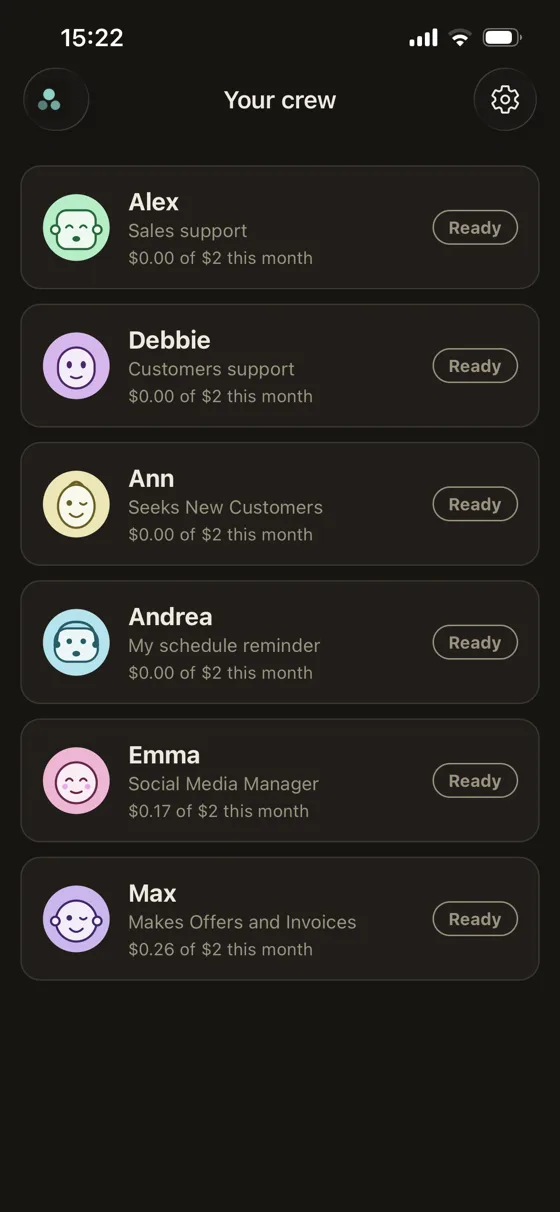
The CrewPoppy phone app pairs to your own deployment with a one-time code shown on your computer. See who's working and who needs you, chat with any agent, attach a document, stop a run, and approve or refuse what an agent wants to send — with the full message in front of you.

The CrewPoppy phone app listing your AI agents, each with its face, role and spend so far this month. An approval waiting on the phone, showing the complete message the agent wants to send.

You always know what it costs

Every agent has a monthly spending limit you set, and a run that would exceed it refuses to start. What it has spent is on screen next to that limit, taken from the same counter that enforces it — so the number you read and the number that stops a run can never disagree. Creating agents is free; you only pay AWS when one actually runs.

Notifications are the one paid extra. Everything else — the agents, the approvals, the phone app itself — is free. Your phone buzzing on its own is the part that runs on our servers rather than in your AWS, and that is what's paid for.

What we can and can't see

Your agents' instructions, conversations, files and cloud resources stay in your AWS account. We don't receive them and we can't read them.

There is one deliberate exception, and it only exists if you turn notifications on: to make your phone buzz, we store your device's notification token and the identifier of your sign-in pool, and each alert carries the agent's name and what kind of attention it needs — never what it's about. The app then fetches the actual content from your own AWS when you open it. Turning notifications off removes that.

The full detail is in our privacy policy.

Support

Questions, problems, or anything about your account: email support@crewpoppy.com and a human will read it.

Getting started

Install AgentsPoppy, add CrewPoppy from the directory, connect your AWS account, and create your first agent. It takes a few minutes.

Source available

CrewPoppy's code is public on GitHub under the PolyForm Shield licence — readable and usable, but not for building a competing product.

Your data, your exit

Export all your agents as a spreadsheet whenever you like, and remove CrewPoppy without leaving anything behind in your account.